Build transport graphs
This notebook shows how to build drive, walk, public-transport, and intermodal UrbanGraph objects for one territory. The examples use osm_id=1114252 so the same boundary can be reused across graph builders.
# To install IduEdu in a clean environment:
# !pip install IduEdu

OSM_ID = 1114252
from iduedu import get_4326_boundary

boundary = get_4326_boundary(osm_id=OSM_ID)
Drive graph and the simplify parameter
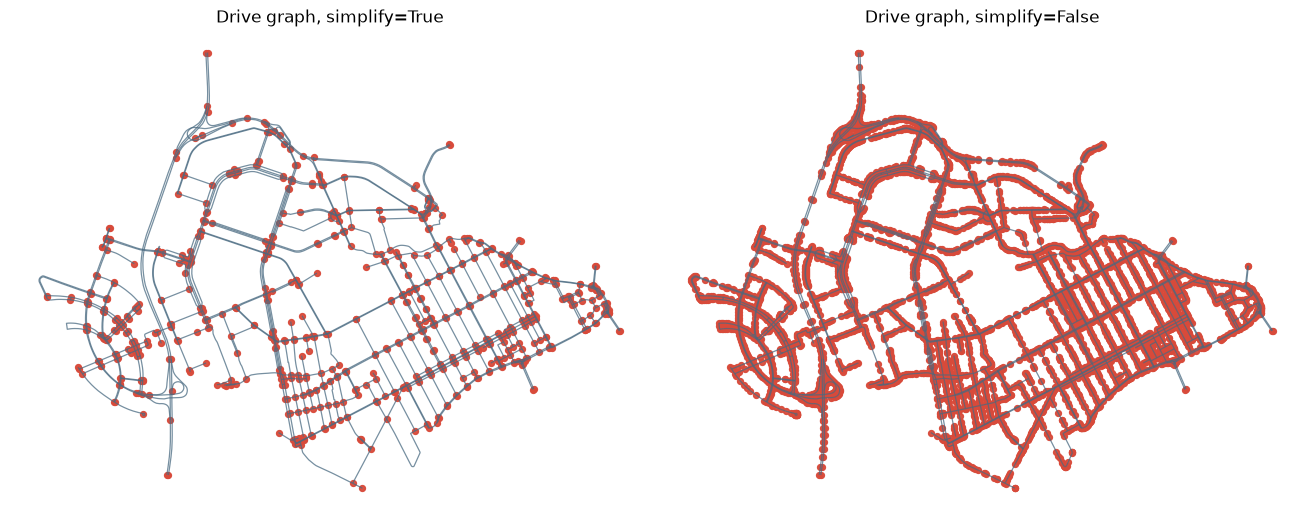
simplify=True merges chains of raw OSM segments into longer graph edges. simplify=False keeps the detailed per-segment topology. The difference is easiest to see when edges and nodes are plotted together.
from iduedu import get_drive_graph

G_drive_simple = get_drive_graph(
    osm_id=OSM_ID,
    simplify=True,
    clip_by_territory=False,
    keep_largest_subgraph=False,
)

G_drive_detailed = get_drive_graph(
    osm_id=OSM_ID,
    simplify=False,
    clip_by_territory=False,
    keep_largest_subgraph=False,
)

print(
    "simplify=True :",
    len(G_drive_simple.nodes_gdf),
    "nodes,",
    len(G_drive_simple.edges_gdf),
    "edges",
)
print(
    "simplify=False:",
    len(G_drive_detailed.nodes_gdf),
    "nodes,",
    len(G_drive_detailed.edges_gdf),
    "edges",
)
simplify=True : 748 nodes, 1246 edges
simplify=False: 6558 nodes, 7056 edges
import matplotlib.pyplot as plt


def plot_graph_edges_and_nodes(graph, ax, title, edge_color="#496A81", node_color="#D84A3A"):
    graph.edges_gdf.plot(ax=ax, color=edge_color, linewidth=0.9, alpha=0.75)
    graph.nodes_gdf.plot(ax=ax, color=node_color, markersize=18, alpha=0.95)
    ax.set_title(title)
    ax.set_axis_off()


fig, axes = plt.subplots(1, 2, figsize=(13, 6), constrained_layout=True)
plot_graph_edges_and_nodes(G_drive_simple, axes[0], "Drive graph, simplify=True")
plot_graph_edges_and_nodes(G_drive_detailed, axes[1], "Drive graph, simplify=False")
plt.show()
Clipping by the exact territory boundary
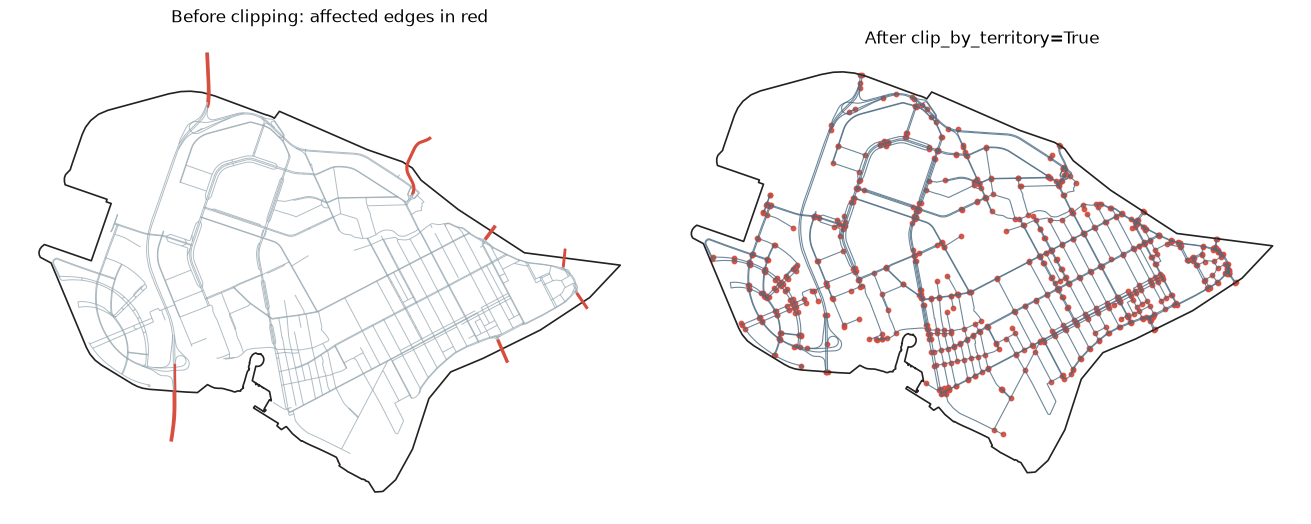
OpenStreetMap ways can cross the requested boundary. With clip_by_territory=True, edge geometries are clipped by the projected boundary before graph construction. The red edges below are the geometries affected by clipping.
import geopandas as gpd

G_drive_unclipped = get_drive_graph(
    osm_id=OSM_ID,
    simplify=True,
    clip_by_territory=False,
    keep_largest_subgraph=False,
)
G_drive_clipped = get_drive_graph(
    osm_id=OSM_ID,
    simplify=True,
    clip_by_territory=True,
    keep_largest_subgraph=False,
)

boundary_local = gpd.GeoDataFrame(geometry=[boundary], crs=4326).to_crs(G_drive_unclipped.crs)
boundary_geom = boundary_local.geometry.iloc[0]

unclipped_edges = G_drive_unclipped.edges_gdf
affected_mask = ~unclipped_edges.geometry.within(boundary_geom)
affected_edges = unclipped_edges.loc[affected_mask]

print("Edges before clipping:", len(G_drive_unclipped.edges_gdf))
print("Edges affected by clipping:", len(affected_edges))
print("Edges after clipping:", len(G_drive_clipped.edges_gdf))
Edges before clipping: 1246
Edges affected by clipping: 14
Edges after clipping: 1246
fig, axes = plt.subplots(1, 2, figsize=(13, 6), constrained_layout=True)

boundary_local.boundary.plot(ax=axes[0], color="#222222", linewidth=1.2)
unclipped_edges.plot(ax=axes[0], color="#8FA1AB", linewidth=0.7, alpha=0.7)
if not affected_edges.empty:
    affected_edges.plot(ax=axes[0], color="#D84A3A", linewidth=1.6, alpha=0.95)
axes[0].set_title("Before clipping: affected edges in red")
axes[0].set_axis_off()

boundary_local.boundary.plot(ax=axes[1], color="#222222", linewidth=1.2)
G_drive_clipped.edges_gdf.plot(ax=axes[1], color="#496A81", linewidth=0.8, alpha=0.8)
G_drive_clipped.nodes_gdf.plot(ax=axes[1], color="#D84A3A", markersize=10, alpha=0.9)
axes[1].set_title("After clip_by_territory=True")
axes[1].set_axis_off()

plt.show()
Keeping the largest component
keep_largest_subgraph=True removes disconnected fragments. For directed drive graphs the default mode keeps the largest strongly connected component.
G_drive_all = get_drive_graph(
    osm_id=OSM_ID,
    simplify=True,
    keep_largest_subgraph=False,
)
G_drive_main = get_drive_graph(
    osm_id=OSM_ID,
    simplify=True,
    keep_largest_subgraph=True,
)

print("All components:", len(G_drive_all.nodes_gdf), "nodes,", len(G_drive_all.edges_gdf), "edges")
print("Largest component:", len(G_drive_main.nodes_gdf), "nodes,", len(G_drive_main.edges_gdf), "edges")
2026-09-15 14:01:06.436 | WARNING | Removing 39 nodes outside the largest strongly connected component. Retaining 709 of 748 nodes.
All components: 748 nodes, 1246 edges
Largest component: 709 nodes, 1190 edges
Walk graph
Pedestrian graphs are undirected by default. Use walk_speed to control the time_min edge weight.
from iduedu import get_walk_graph

G_walk = get_walk_graph(
    osm_id=OSM_ID,
    simplify=True,
    walk_speed=5 * 1000 / 60,
    keep_largest_subgraph=True,
)

G_walk
2026-09-15 14:01:07.332 | WARNING | Removing 330 nodes outside the largest connected component. Retaining 19802 of 20132 nodes.
UrbanGraph(nodes=19802, edges=26658, is_multigraph=True, is_directed=False, edge_direction_column=None, crs='EPSG:32636', type='walk')
Public-transport graph
transport_types accepts one type or a list of types. Travel time is computed with the active transport registry.
Routes continue far beyond the district, so clip_by_territory=True keeps only the parts inside it. Without clipping, stops outside the walking network cannot be attached to it and are dropped when the layers are joined below.
from iduedu import get_public_transport_graph

G_pt = get_public_transport_graph(
    osm_id=OSM_ID,
    transport_types=["bus", "tram"],
    clip_by_territory=True,
)

G_pt.edges_gdf[["type", "route", "length_meter", "time_min"]].head()
| type | route | length_meter | time_min | |
|---|---|---|---|---|
| 0 | bus | 220 | 373.759 | 1.111 |
| 1 | bus | 220 | 241.285 | 0.901 |
| 2 | bus | 220 | 362.113 | 1.078 |
| 3 | bus | 220 | 456.592 | 1.216 |
| 4 | bus | 220 | 713.562 | 1.592 |
G_pt.edges_gdf.explore(column="route",tiles='CartoDB Positron')
Join public transport with walking
join_pt_walk_graph connects platform-like public-transport nodes to nearby walking edges. get_intermodal_graph runs the walk and PT builders and then joins them in one call.
from iduedu import get_intermodal_graph, join_pt_walk_graph

G_joined = join_pt_walk_graph(
    G_pt,
    G_walk,
    max_dist=30,
    keep_largest_subgraph=True,
)

G_intermodal = get_intermodal_graph(
    osm_id=OSM_ID,
    max_dist=30,
    clip_by_territory=True,
    pt_kwargs={"transport_types": ["bus", "tram"]},
    walk_kwargs={"simplify": True},
)

G_joined, G_intermodal
2026-09-15 14:01:14.293 | WARNING | Removing 332 nodes outside the largest strongly connected component. Retaining 20940 of 21272 nodes.
(UrbanGraph(nodes=20938, edges=29158, is_multigraph=True, is_directed=True, edge_direction_column='oneway', crs='EPSG:32636', type='intermodal'),
 UrbanGraph(nodes=20940, edges=29162, is_multigraph=True, is_directed=True, edge_direction_column='oneway', crs='EPSG:32636', type='intermodal'))